1. What a “wall printing machine” means
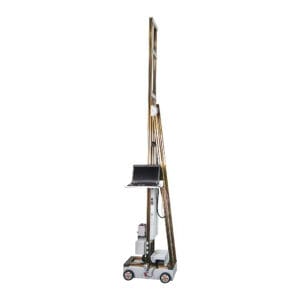
A wall printing machine is a wall printer that prints images directly onto vertical walls. You may also see these names:
- wall printer machine
- vertical wall printer / vertical wall printing machine
- UV wall printer / UV wall printing machine
- wall mural printer / mural printing machine
- direct-to-wall printer (DTW wall printer)
- automatic wall printing machine (buyers usually mean “easier positioning + more stable workflow”)
If you search any of the terms above, your goal is usually the same: seamless wall murals, printed on-site, without wallpaper seams or decal bubbles.
2. Types of wall printing machines
Different types decide what jobs you can take, how fast you can finish, and how consistent your results are.
Type 1: Portable / mobile wall printers (best for service teams)
Also searched as mobile wall printer, portable wall printing machine, or “start a wall printing business”.
Best for
- on-site mural printing services
- small teams that travel often
- shops, cafés, offices, and residential jobs
Pros
- easier transport and storage
- faster deployment for small/medium walls
- lower barrier for your first machine
Trade-offs
- leveling discipline is critical
- heavy texture walls reduce fine detail
- very large daily output may need a heavier configuration
Type 2: Commercial / industrial wall printers (best for repeatable output)
Also searched as commercial wall printer and industrial wall printer.
Best for
- weekly or daily commercial jobs
- large walls and long murals
- franchise rollouts and standardized branding
Pros
- stability and repeatability are easier to maintain
- fewer misalignment issues on long runs
- better for scaling teams (less operator-dependent)
Trade-offs
- higher packing/shipping/transport requirements
- usually higher total cost
Type 3: Indoor wall printer vs outdoor wall printer
Also searched as outdoor wall printer, exterior wall printer, or “print murals on exterior walls”.
Indoor wall printer
- smoother walls, controlled lighting
- best for photo murals, gradients, fine typography
Outdoor wall printer
- dust, wind, moisture risk must be managed
- best for bold, high-contrast murals
- test patch becomes mandatory, not optional
Type 4: Wall printer vs UV flatbed vs decals/wallpaper (don’t compare the wrong tool)
| Method | Best for | Output look | Common limits |
|---|---|---|---|
| Wall printing machine (UV wall printer) | Seamless murals on walls | No seams, strong impact | Texture reduces fine detail |
| UV flatbed printer | Rigid boards/panels | Very crisp on flat materials | Not direct-to-wall |
| Vinyl decals / wall sticker printing | Small logos, simple text | Fast on smooth walls | Seams/bubbles on big murals |
| Custom wallpaper printing | Removable coverage | Panel-based finish | Seams + installation labor |
3. Features that actually change real output (and profit)
Most spec sheets are noise. These items change your results in the field.
1) Positioning, leveling, and wall distance (the #1 quality factor)
Most “bad printing” is setup, not ink.
If you want clean edges and straight lines, you need:
- stable rail/base leveling
- consistent distance to the wall
- reliable start-point alignment
- repeatable movement with minimal drift
Quick tip: if a supplier only shows output on perfect smooth boards, ask for output on real walls (drywall/brick/concrete).
2) White ink workflow (for dark walls and bright branding)
People search white wall printing, “print on dark walls,” and “bright logo on black wall”.
- You should consider white ink if you do:
- logos/text on dark paint
- bright brand colors on colored concrete
- mixed surfaces where you need consistent color pop
3) Real speed vs advertised speed (sqm/h)
People search high speed wall printer, but your true speed includes:
- setup + leveling
- test patch
- printing passes
- rework time
- packing and site exit
A machine that prints “fast” but causes rework is slower and less profitable.
4) Resolution & pass settings (what customers notice)
Customers notice:
- faces and gradients
- small text sharpness
- banding on large solid colors
- edge cleanliness around logos
Rule of thumb
- simple patterns can run faster
- photo murals need higher-quality passes
- textured walls reduce the benefit of extreme resolution
5) Software workflow & file handling (hidden cost)
Buyers also search wall printer file format and “how to set mural size”.
You want software that makes it easy to:
- set exact print size to real dimensions
- position the artwork accurately
- manage white-ink layers if needed
- resume or reprint a section safely
4. Real output depends on the wall (not only the machine)
You can have a strong machine and still get weak results on bad walls.
What changes output most (in order)
- Wall texture
- Wall cleanliness (dust/oil)
- Moisture (avoid printing until fully dry)
- Lighting (can expose banding)
- File quality (small image stretched big looks cheap)
Output expectations by wall surface (practical guide)
This section helps you rank for “printer for brick walls”, “printer for concrete walls”, “glass wall printer”, “wood wall printing machine”.
| Keyword intent | Surface | Real output look | Best design style | First thing you should do |
|---|---|---|---|---|
| printer for brick walls / brick wall printing | Brick | Fine detail softens | Big shapes, high contrast | Clean grooves + test patch |
| printer for concrete walls / concrete wall printing | Concrete | Strong, slightly “industrial” | Logos, patterns, murals | Remove dust; seal if porous |
| indoor wall printer / office wall graphics | Smooth drywall | Crisp edges + gradients | Photos, faces, typography | Clean + dry |
| vertical printer for textured surfaces | Heavy texture | Softer edges and text | Bold art | Prime/flatten if possible |
| glass wall printer / print on glass | Glass | Can be crisp, adhesion-sensitive | Logos, clean graphics | Degrease + test adhesion |
| wood wall printing / wood panel | Wood | Color shift possible | Murals, patterns | Seal/prime + test color |
| tile wall printing / print on tile | Tile | Crisp if degreased | Logos, icons | Degrease thoroughly |
Rule you can trust: always do a small test patch on the real wall before full printing.
5. Demo checklist (what to request before you buy)
A good demo should match your real jobs:
- your target wall material (or closest match)
- a dark-wall test if you need white ink
- a sample with small text + gradients + a face
- close-up edge photos + normal lighting photos
- a short video showing alignment and straight lines
Red flags
- only far-distance photos
- refusing to show close-ups
- only showing output on perfectly flat boards
- avoiding dark-wall questions
6. Wall Printer Quote Checklist (Send These 7 Items)
To get an accurate wall printing machine quote fast, you can send:
- Country + city (for shipping estimate)
- Typical wall height range (e.g., 2.5m / 3m)
- Typical job size (sqm per job + jobs per month)
- Main wall surfaces (drywall / brick / concrete / tile / wood / glass)
- Indoor only or indoor + outdoor
- Dark walls needed? (white ink workflow: yes/no)
- Power standard (voltage + plug type)
CTA: Send these 7 items and you’ll get a recommended configuration + a clear quote.
FAQs:
What is a vertical wall printer?
A vertical wall printer is a wall printing machine designed to print directly on vertical walls, focusing on stable positioning and consistent wall distance.
How does a wall printing machine work?
You level the rail/base, set distance, load the file at real dimensions, test patch, then print in passes. UV curing helps ink dry fast.
What is the best wall printer?
“Best” depends on your wall height range, main surfaces, indoor/outdoor needs, and whether you print on dark walls (white ink). Use the buyer scenario section to choose the right type.
Are wall printer reviews reliable?
They are most reliable when they show: real wall materials, close-up edges, normal lighting, and a full on-site workflow (not just studio samples).
Can I print on brick walls and still get sharp output?
You can print on brick walls, but texture reduces fine detail. Bold designs and high contrast look best.